Plenty of people want to download their Spotify playlists to an MP3 player, ideally as MP3s at 320 kbps. Can it be done?
Copying Spotify tracks straight to an MP3 player doesn't work: downloaded songs only play inside the Spotify app, even on Premium. A Spotify to MP3 converter turns your playlists into ordinary MP3 files at up to 320 kbps, which play on almost any MP3 player.
One thing changed in 2026: Spotify Premium no longer stops at 320 kbps. Since the Lossless rollout, Premium streams reach 24-bit/44.1 kHz FLAC in 50+ countries at no extra cost. That gives you a choice at the conversion step: pick MP3 at 320 kbps if you want files that work on every player, or FLAC if your player supports it and you want to keep the full quality of the source. This guide covers both.
An MP3 player is still handy on the go: no mobile data, your phone battery lasts longer, and there's no screen to crack. One caveat worth knowing: Mighty is the only player with official Spotify support, and Mighty has confirmed that support ends on April 21, 2027. Converting to MP3 is what keeps your library playable after that.
Want to stream your Spotify music on MP3 player sincerely? Well, you are in luck, as things will change thanks to the coming out of NoteBurner Spotify Music Converter.
It is a brilliant Spotify Playlist to MP3 Converter tool, which can help you easily convert songs and playlists from Spotify to MP3, FLAC, AAC, AIFF, WAV, or ALAC at 40X faster speed with 100% original quality kept. Thus you will be able to transfer all of your downloaded songs from Spotify to mp3 player, such as Sony Walkman or iPod Shuffle, stream without Spotify app. The most important is, you can store all of Spotify songs and playlists on MP3 player forever.
Seeking a way to transfer Amazon Music to MP3 players or any other device? NoteBurner Amazon Music Converter is all you need to download any Amazon Music to MP3/AAC/WAV/FLAC/AIFF/ALAC format losslessly.


Below is a step-by-step tutorial on how to download Spotify songs and playlists and transfer them to your MP3 player. Install the tool on your computer before you start.
Note: If you are a Windows user, please refer to How to Download Music from Spotify to Windows PC for detailed steps.
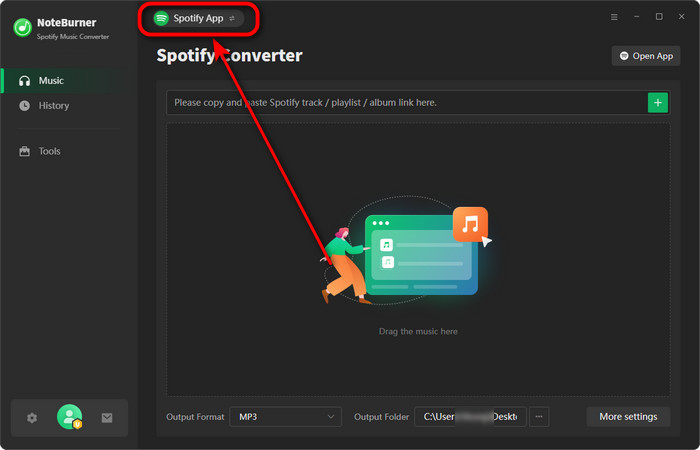
Please download and then install the latest version of NoteBurner Spotify Music Converter. Then choose the "Spotify App" download mode.
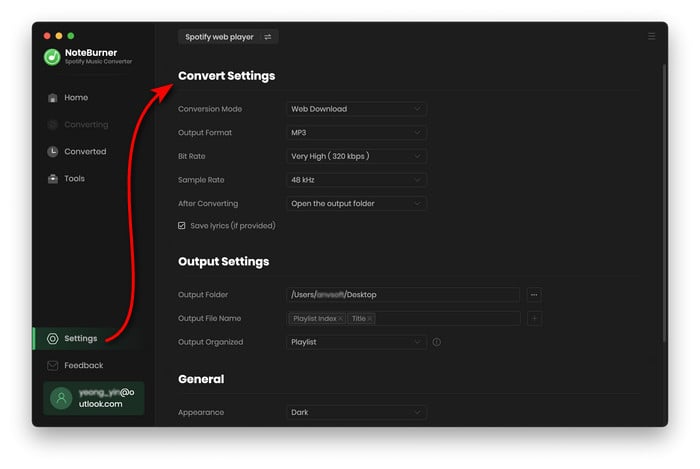
Click the Settings button to set the output format, quality and destination folder. You can convert Spotify songs to MP3, AAC, FLAC, AIFF, WAV, or ALAC with high quality (320 kbps is available to choose).
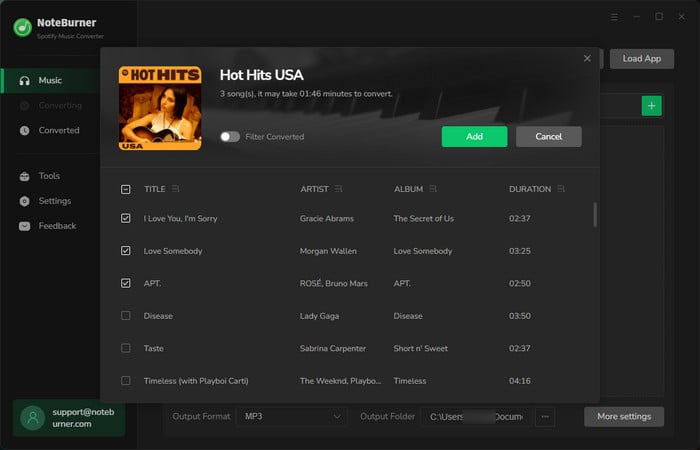
On your Spotify desktop app, open a playlist you want to download, then simply click "Share > Copy Link", and paste the music link to NoteBurner for parsing songs. Then select the songs that you want to transfer to MP3 player.
After the above settings, click "Convert" to start converting Spotify songs to MP3. After converting, the output folder will be open automatically. Or you can click the "History" button on the left side to find the converted music.
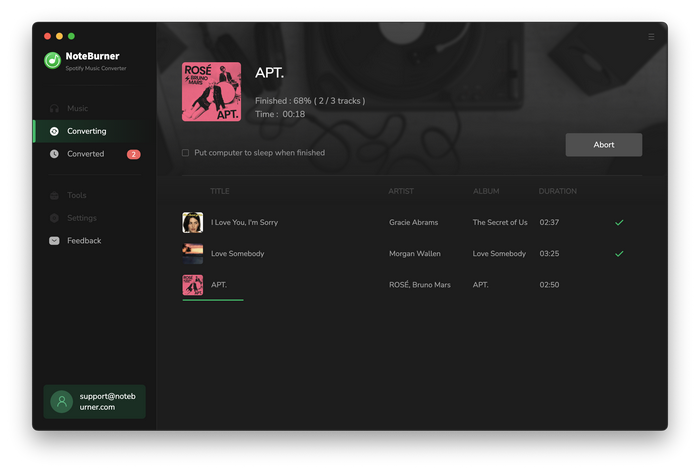
Now, connect your MP3 player to computer via a USB cable, then you can directly copy and paste the Spotify songs to MP3 player. Once all the music transfers are complete, you can enjoy Spotify music on your MP3 player freely.
We have listed the 15 best portable MP3 players with Spotify app in this article. Come here and choose the one that suits you most. Learn More →
Disclaimer: For personal/educational use only. 🚫 Do not distribute downloaded music/video for commercial use.
Getting Spotify music onto an MP3 player comes down to one step the Spotify app can't do for you: turning protected downloads into standard audio files. Once that's done, the files are yours to organize, back up, and move between devices, with no app and no subscription check in the way.
Which format should you pick? Go with MP3 at 320 kbps if compatibility matters most, since every MP3 player made in the last two decades will read it. Go with FLAC if your player supports it and you want to keep the quality of Spotify's lossless streams intact. NoteBurner handles both, along with AAC, WAV, AIFF, and ALAC.
The free trial converts the first minute of each track, which is enough to check output quality on your own player before you decide.
 What's next? Download NoteBurner Spotify Music Converter now!

One-stop music converter for Spotify, Apple Music, Amazon Music, Tidal, YouTube Music, etc.

Convert Apple Music, iTunes M4P Music, or Audiobook to MP3, AAC, WAV, AIFF, FLAC, and ALAC.

Convert Amazon Music to MP3, AAC, WAV, AIFF, FLAC, and ALAC with up to Ultra HD quality kept.

Convert Tidal Music songs at 10X faster speed with up to HiFi & Master Quality Kept.

Convert YouTube Music to MP3, AAC, WAV, AIFF, FLAC, and ALAC at up to 10X speed.

Convert Deezer HiFi Music to MP3, AAC, WAV, AIFF, FLAC, and ALAC at 10X faster speed.

Transfer playlist between Spotify, Apple Music, Amazon Music, YouTube Music, and more.