
Yes, all you need is a reliable tool.
Spotify typically offers three types of subscriptions: Spotify Free, Spotify Premium ($12.99 per month), and Spotify Family ($21.99 per month). If you are a Spotify Free user, you can listen to tons of songs, discover new music, share playlists with friends, and so on. But notably, the Free version has to endure ad-sponsored playback and limited skips. And the offline download is not available. To address such inconvenience, discover several working methods to save songs or playlists from Spotify for free in this post. Alternatively, go for a popular solution, NoteBurner Spotify Music Converter, to download Spotify music without Premium.
Before downloading music from Spotify Free, first, let's learn how to enable the Spotify internal download feature for Premium users. Simply follow the steps below to download your favorite tracks for offline streaming on the Spotify app.
Step 1Find the Spotify tracks you want to download. Be advised that you can't download individual songs; you must put them in a playlist and download the entire playlist.
Step 2Enable the download button.
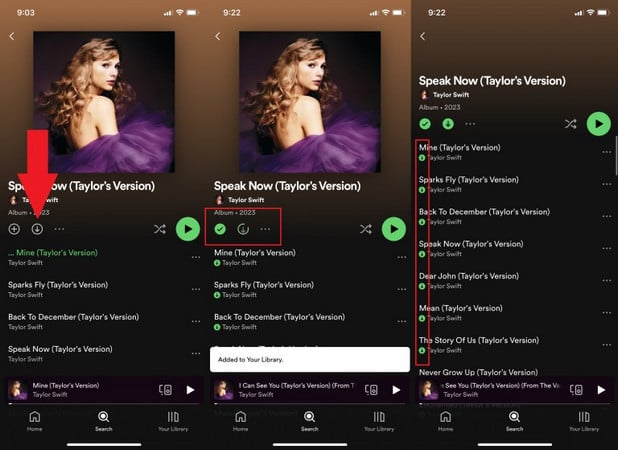
On the Android/iOS Spotify App, toggle on the "Download" button.
On the Desktop Spotify App, click on the down arrow button.
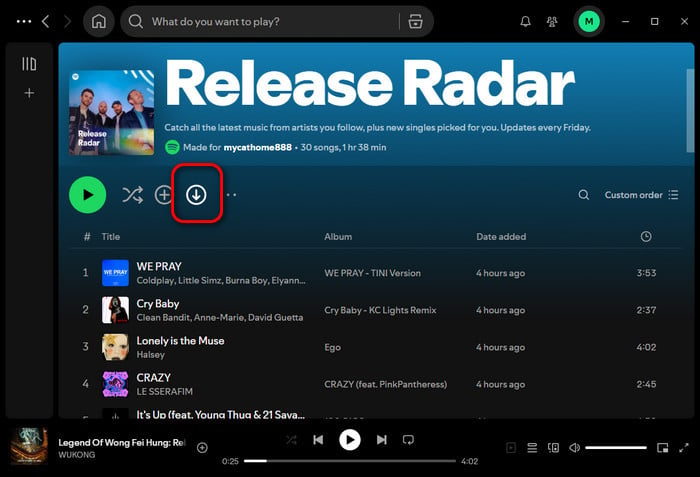
Once there is a green arrow showing up, it's indicated that the download was successful and they're ready for offline listening.
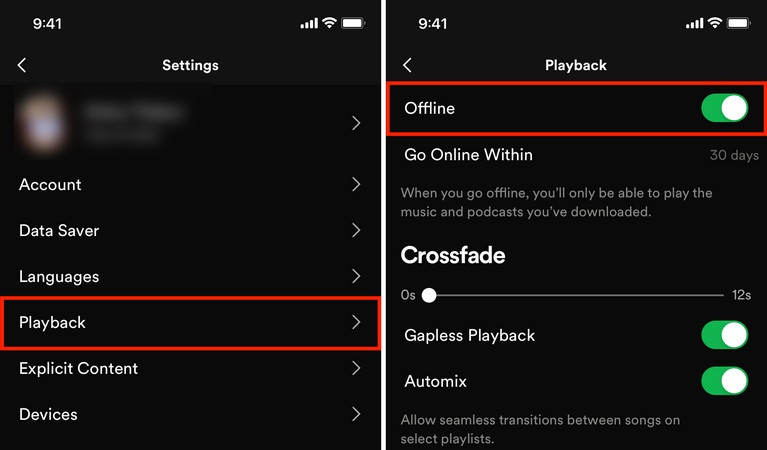
Step 3Go to Your Library. Tap the settings icon (usually a gear) in the upper right corner. Tap on "Playback" and switch on "Offline." With Offline Mode enabled, you can now listen to your downloaded Spotify music without using any data.
Note: You won't own any Spotify music even if you've downloaded it. The allegedly downloaded Spotify songs would only be saved on the cloud, not in the local computer drive. So if you want to completely download songs from Spotify Premium & Free accounts to your PC, Macbook or Android, a powerful NoteBurner Spotify downloader is required.
Here we’re going to introduce 4 best ways to download Spotify songs without Premium. Just Dive in.
| Type | Tool | No Ads | Batch Downloads | Spotify Premium Required | Download Formats | Max Audio Quality | Recommendation |
|---|---|---|---|---|---|---|---|
| Desktop App (Windows/Mac/Android) |
NoteBurner Spotify Music Converter | ✔ | ✔ | NO | MP3, MP4, AAC, WAV, FLAC, AIFF, ALAC | 320kbps + Spotify Lossless 24-bit | ★★★★★ |
| Mobile (Android/iOS) | SpotiFlyer, Spotify Telegram Bots | ✔ | ✘ | NO | MP3 | 256kbps | ★★★ |
| Freeware (Windows PC) | Sidify Converter Free | ✔ | ✔ | NO | MP3 | 256kbps | ★★★★ |
| Online Tools |
spotidown.co spotidownloader.com |
✘ | ✘ | NO | MP3 | Inconsistent (64kbps–256kbps) | ★★★ |

Website: https://www.noteburner.com/sp-music-converter-windows.html
Best for: Converting Spotify playlists in batches - no ads, no Premium needed.
It is a specialist in converting Spotify songs to plain formats (MP3/AAC/WAV/FLAC/AIFF/ALAC) with intact ID3 tags retained, available for both Spotify Free and Premium users. NoteBurner Spotify Music Converter batch downloads your desired playlists, albums, podcasts, and videos from Spotify, while keeping Spotify 320kbps quality and even Spotify Lossless 24-bit. Moreover, this NoteBurner tool can even remove ads from all your Spotify Free music tracks. With this Spotify downloader, you can easily listen to ad-free and high-quality Spotify songs offline without Premium.

| Feature | Spotify Free | Spotify Premium | NoteBurner Spotify Downloader |
| Offline Listening |  |
 |
|
| Ads-Free Playback | |
|
|
| MP3 Export | |
|
|
| Download Spotify Lossless | |
|
|
| Keep Songs Forever | |
|
|
The following is a step-by-step guide on how to free download music from Spotify for Windows PC. The good thing is, even without a Spotify Premium account, you can still download Spotify songs for offline playback.
✅Tips: NoteBurner is well compatible with the latest versions of Windows PCs, Macs, and Android. For Mac users, please turn to the detailed tutorial on How to Download Music with Spotify Free on Mac; For Android users, you can skip to Method 2.
Step 1 First up, download, install, and launch the correct version of NoteBurner Spotify Music Converter on your computer. Choose Spotify App Mode or Spotify Web Mode for conversion.
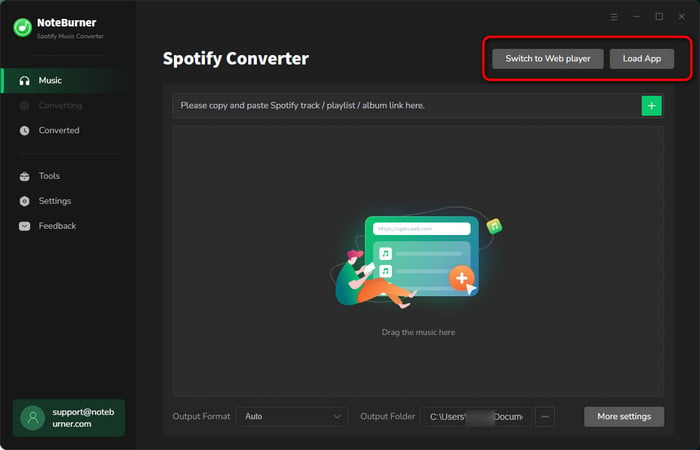
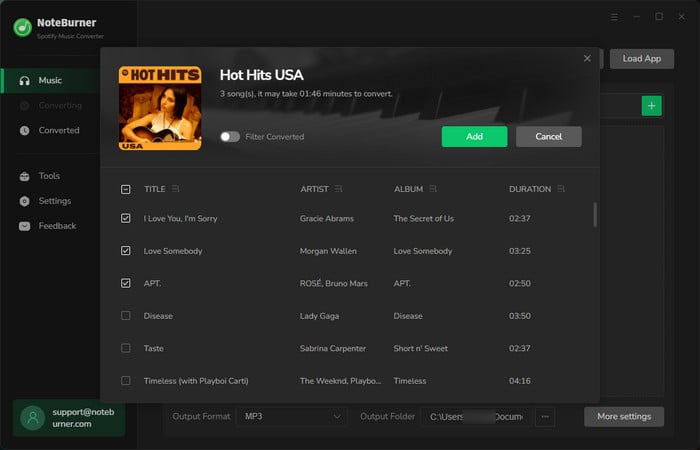
Step 2 Open the Spotify playlist you intend to download, simply copy and paste or drag and drop the playlist link from Spotify Free to NoteBurner.
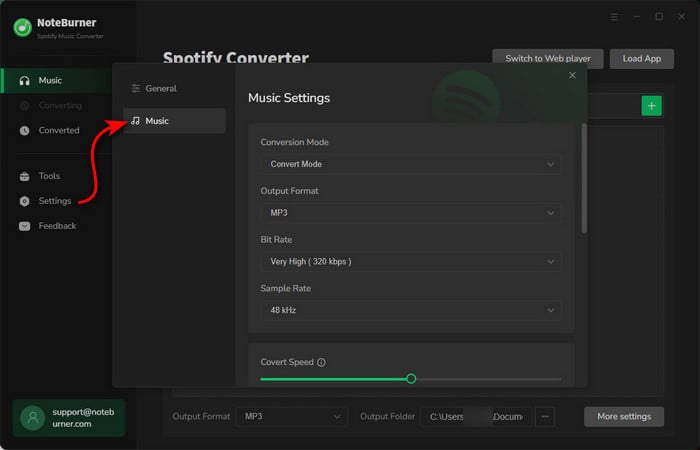
Step 3 Click the gear icon to open the Settings menu. Here you can choose output format (MP3, AAC, FLAC, AIFF, WAV, or ALAC), output quality, and output path as well.
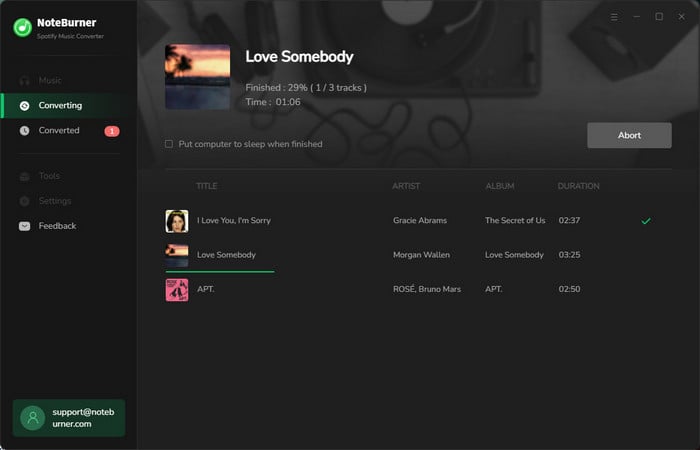
Step 4 Click the button "Convert" to start downloading Spotify songs via the Free account. When the conversion is done, all the Spotify Free songs have already been saved to a computer locally.
Step 5 Bravo! By clicking the converted button on the left side or directly going to the output folder you set, you can find all the downloaded Free Spotify audio files. Now you can enjoy your downloaded Spotify music anywhere anytime without ads interruption.
Want to download songs from Spotify Free to Android or iOS devices? We've also listed three working tools for you.
 2.1 Use NoteBurner Spotify Downloader APK
Website: https://www.noteburner.com/sp-music-converter-windows/tutorial-android.html
Best for: Saving Spotify playlists to your Android phone without a Premium subscription.
This Spotify Downloader APK mainly works on your Android device, enabling all Spotify users to save Spotify tracks to local MP3, FLAC, WAV, etc. It is embedded with a Spotify web player that records songs from Spotify Free/Premium at a fast speed. The workflow is simple-all you need is a stable network and a Spotify Free account. It later does the rest for you.
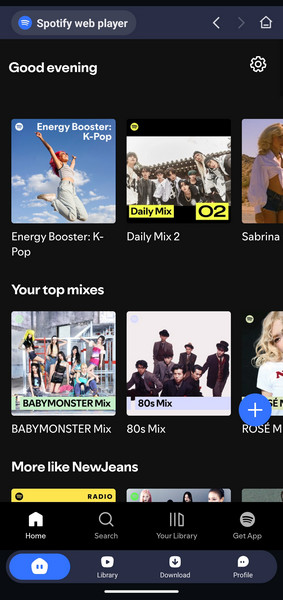
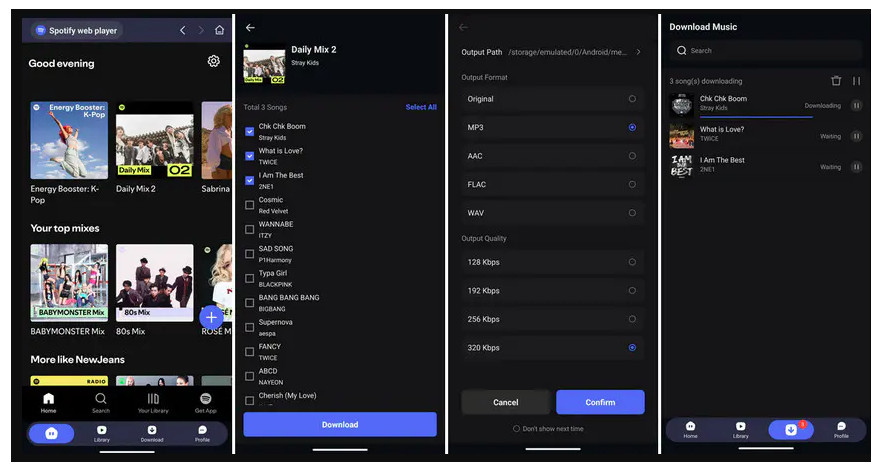
Step 1 Install the NoteBurner APK on the phone. Sign in to your Spotify account on the built-in Spotify web player.
Step 2 Navigate to the Spotify playlist, album, podcast, or audiobook on the web player and find and tap on the + icon.
Step 3 In the audio settings, pick your preferred format (MP3 recommended), quality (up to 320kbps), and output path on your Android.
Step 4 Click on "Download," and then you can monitor the download progress.
Step 5 Once downloaded, open the "Library," and you can now play Spotify MP3 songs offline - no Spotify Premium needed!
 2.2 Use SpotiFlyer Spotify Free Downloader
Website: https://spotiflyer.app/app/
Best for: Free downloading Spotify MP3 audio for listening offline on Android.
SpotiFlyer is mainly built for Android, but there are ways people use it on iPhone too. You can just copy and paste the music links from Spotify Free to this tool; it will automatically analyze them and download them. The downloaded tracks are saved locally on your phone, so you can play them offline without Spotify ads interrupting everything. It’s suitable for casual downloads, but note that the output quality is not up to the original streams. Most downloads seemed capped around 160kbps or so.
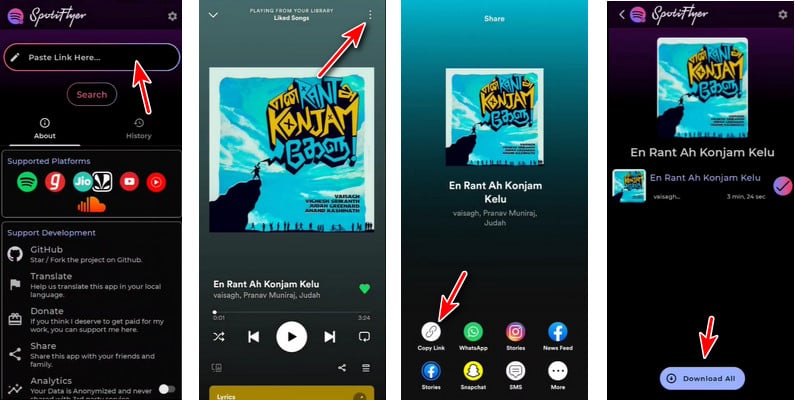
Step 1 Download the SpotiFlyer APK from a source you trust.
Step 2 Open Spotify, copy the song/playlist link you want, then paste it into SpotiFlyer. Hit "Search" and let it analyze the link.
Step 3 Tap "Download All" and wait for the tracks to finish downloading. Once it’s done, you can find them in the selected download folder/local storage.
Check the top 8 best Spotify Downloaders APKs and Spotify playlist to MP3 converters.
2.3 Use Spotify Telegram BotWebsite: https://t.me/SpotifyMusicDownloaderBot
Best for: Saving Spotify tracks on iPhone/Android without payment.
The Spotify Telegram Bot provides another solution for getting Spotify songs downloaded on the phone without Premium. Just download the Telegram application on your mobile, find out the bot, and then send the Spotify links to it. The MP3 download links regarding your Spotify songs will be returned quickly. There are multiple Spotify downloading bots, like TT Audio Bot, Sound2Bot, Spotify Bot, etc. You can pick the one that works on your side.
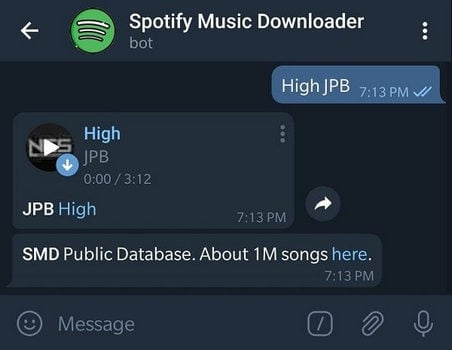
Step 1 Search and get the working Telegram Spotify bot on your Android device.
Step 2 Start a conversation with the bot and share the Spotify track link in the message box.
Step 3 The bot will extract the song link and show the matching result.
Step 4 Choose the one you want, then click the download button to save the Spotify song locally to your Android device.
The post introduces 10+ best Telegram Spotify Bots, along with easy-to-follow steps.
Website: https://www.sidify.com/sidify-music-free/music-converter-free.html
Best for: Windows PC users who want to export Spotify tracks to MP3 at no cost.
If you prefer freeware, a program called Sidify Music Converter Free is a decent option. This converter app allows you to download music from Spotify Free and convert it into an MP3 file with no charge. It Sidify Music Converter Free works similarly to NoteBurner Spotify Music Converter; however, it captures sounds from YouTube Music instead.hat said, you'll get a maximum of audio quality at 160kbps, much lower than the output quality from NoteBurner.
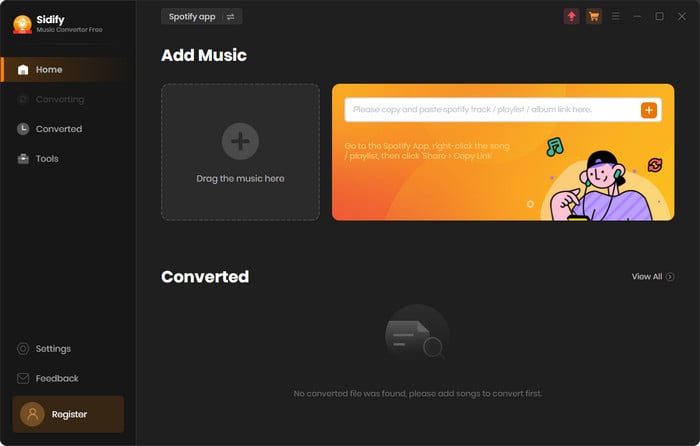
Step 1 Download and run the free app on your PC.
Step 2 On the embedded Spotify web player, open the artist or playlist you intend to download. Click the add button to load the music to the converter.
Step 3 Open Settings and choose the MP3 output format or others.
Step 4 Click on "Convert" to activate the download process. Then, you can go to History to view all Spotify Free music downloads.
Here this page you'll get the most popular free Spotify to MP3 converter to use. Besides that, you'll also get the best Spotify to MP3 320 kbps downloader from NoteBurner.
Occasionally, you may have an instant need to convert Spotify audio to MP3 without any installation. Then, online Spotify music downloaders come as alternatives. Here are two tested tools that actually work in 2026.
4.1 spotidown.co Website: https://spotidown.co/
Best for: Casual users looking to convert a Spotify link to MP3 without Premium and app setup.
An online tool that enables you to download Spotify tracks as MP3s for free. It focuses on easy and quick service, letting you download Spotify audio directly to your PC, with no need for a Premium account.

Step 1 Input the Spotify music link into the search box.
Step 2 Click on the Search button to analyze the link.
Step 3 Once ready, click Save to download Spotify MP3s online.
4.2 spotidownloader.com Website: https://spotidownloader.com/
Best for: Free download of Spotify music with minimal effort.
Like other online Spotify converters, Spotidownloader makes it easy to download Spotify audio into MP3 files—all free of charge. The operation is friendly for even newbies. With a few clicks, select MP3 format and audio quality, and the download will start automatically.

Step 1 Open Spotify, find the desired song or playlist, then hit "Share” → “Copy Link."
Step 2 Paste the link into the search box on the website and click Download.
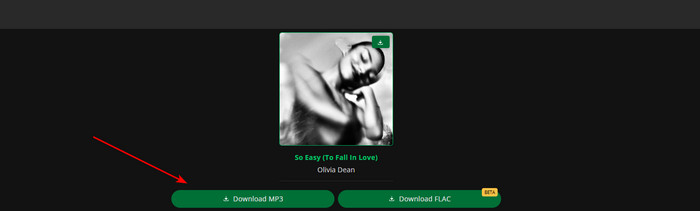
Step 3 Wait for the site to process the link, then click "Download MP3."
Step 4 After it finishes, the file should save directly to your local downloads folder/device storage.
Is Spotidownloader.com safe to use? The review explains everything.
Disclaimer: For personal/educational use only. 🚫 Do not distribute downloaded music/video for commercial use.
Officially no, because Spotify offline playback is limited to the Premium account. But you can utilize a third-party tool to download Spotify offline.
Not all online tools are 100% ad-free and safe. Some of the websites contain suspicious redirects. So be wary of clicking suspicious ads or links when accessing them.
No. The ad-free experience of Spotify goes to Premium only. When it expires, your Spotify account is degraded to the Free tier. To download Spotify songs without ads via a Free account, try NoteBurner Spotify Music Converter.
Yes. NoteBurner works with both Spotify Free and Premium accounts. It can automatically remove the ads from Spotify and export the songs for you.
No. The Lossless option is exclusive to the Premium plan. Despite this, you can still use NoteBurner to download Spotify tunes with up to 320kbps via Spotify Free.
So here on this page, we've listed at least 4 methods to download Spotify songs without Premium on Windows, Mac, Android, or iPhone devices. It's pretty easy to extract MP3s from Spotify Free account, but if you pursue a better sound quality (320kbps) and more stable performance, you should use NoteBurner Spotify Music Downloader. So far, it's one of the most popular Spotify to MP3 converters in the industry, carrying the best music converting feature, professional customer service, in-time software updates, and more. Just give it a try and it won't ever let you down.
 What's next? Download NoteBurner Spotify Music Converter now!



